




Dictation

You want to talk, not type.

Download for Mac
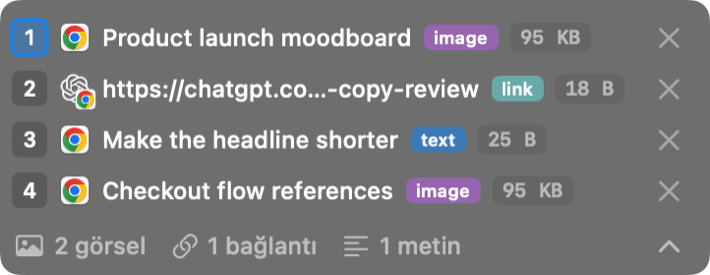
What you copied takes its place inside your speech
What you copied takes its place inside your speecheach attachment by its number
You talk, it becomes text
You talk, it becomes textwhile recording
Your speech goes to the agent you picked beforehand
Your speech goes to the agent you picked beforehandtwo targets at once
The text waits; paste it where you want, when you want
The text waits; paste it where you want, when you wantheld until you paste
Text is ready the moment you stop talking
Text is ready the moment you stop talkingtranscribed, then pasted

Share a recording from Voice Memos or Finder to OptionOS; it becomes text

Voice Memos recording list with Toplantı notu selected Pick the recordingPress Share
Pick the recording
In Voice Memos, click the recording you want as text.

At your fingertips

Start Recording ⌥ALightyou type at the speed you talk, hands off the keys
Cancel Dictation ⌥⎋Lighta wrong start costs nothing
Speak to the focused agent top-right cornerPersonalyour words go straight to the agent in focus
Send When the Agent Is Done ⌃⌥⌘↩Personalthe message sends itself
Focus the Aim After the Dictation ⌃⌥⌘FPersonalyou land where your words went
Add a Note to Dictation ⌥NPersonalyour aside travels with the dictation
Paste the Held Dictation top-right corner ⌥VLightevery held dictation pastes at once; in ChatGPT, Claude or Gemini in the browser each copy lands as its own file
Choose Where the Dictation Goes ⌥⇧VPersonalyour words go where you chose, not where focus is
Copy While Speaking ⌘CLightthe AI knows which agent the line came from
Undo Last Copy ⌥⇧ZLighta wrong copy never reaches the AI
Redo Last Copy ⌥⇧⌘ZLight

What you get

  • Everything joins your speech in the order you said it, numbered; the AI knows what you showed and when
  • You talk, it becomes text
  • Text flows while you talk
  • Text is ready the moment you stop talking
  • Even if the service drops, your speech becomes text
  • The text waits; paste it where you want, when you want
  • Your speech goes to the agent you picked beforehand
  • Your speech goes straight to Claude · Claude Code · Codex · ChatGPT
  • Share a recording from Voice Memos or Finder to OptionOS; it becomes text
  • Everything stays on your Mac; the cloud only if you choose it
  • What you copied takes its place inside your speech
  • The mark is tied to your speech the moment you place it
  • The AI knows which agent a line you copied while talking came from
  • Press ⌥A and talk
  • Turn every shortcut off at once, or one by one
Here for something else? Every door →