Jumpdeck — Option-Tab moves you between live agents the way you move between apps
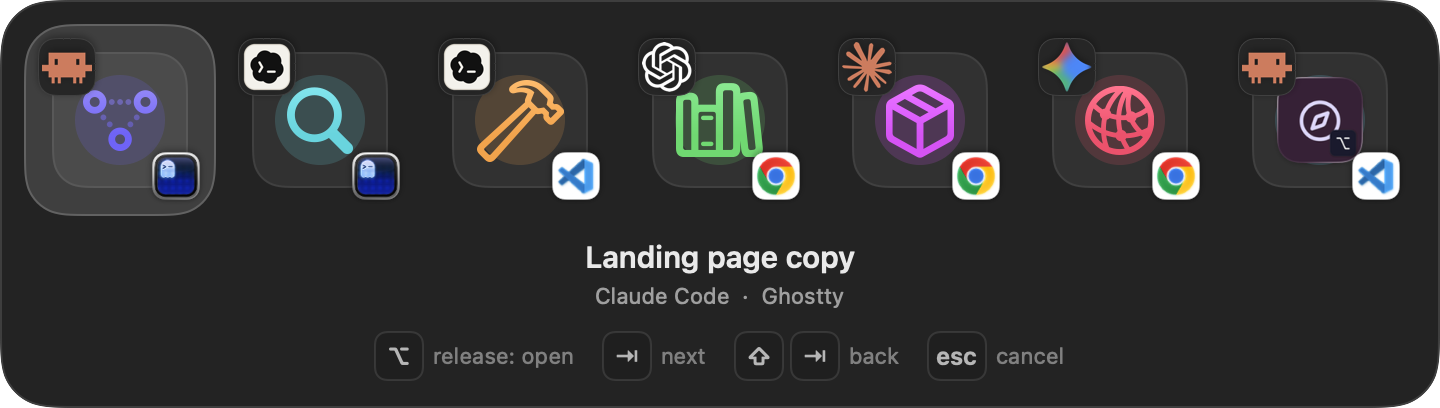
When several agents are running you no longer hunt through terminals, editors and tabs for the next one. Hold Option, press Tab; release Option and the selected agent's session takes focus.
When several agents are running you no longer hunt through terminals, editors and tabs for the next one. Hold Option, press Tab; release Option and the selected agent's session takes focus.
One shortcut, agent sessions only
The panel keeps live sessions in the order they first appeared: a new agent joins the end, a closed one drops out. Focus changes, renames and identity refreshes do not reshuffle it — your muscle memory stays intact.
Each tile answers two questions at once: which work (the agent's own symbol, in its own color) and where it opens (the carrier badge at the bottom right — Ghostty, VS Code, Chrome). An agent whose carrier cannot be measured gets no badge, so an empty slot and "unknown" never look alike.