 OptionOS
 AI Coding Survival Notes — From 6 Months of Claude Code
8 years of building personal software (backend-focused), last 6-7 months of heavy Claude Code usage. Here’s what I experienced.
1. Language Choice: Popular + Strict
LLMs are good at languages with lots of training data. But at the same time, pick a language with a strict compiler.
Why? Errors should blow up at compile time, not runtime. Agent made a mistake → compiler yelled → agent fixed it. In dynamic languages, errors hide and accumulate until they explode.
Swift 6, TypeScript (strict mode) — these work well.
2. Feedback Loop Is Everything
I test every change instantly. Can’t move forward without passing the compiler.
“Looks like it works” is a trap.
Real progress: It works + compiler passes + tests pass.
Swift 6’s concurrency control is huge here — it catches errors automatically. A bug hidden at runtime = a crash in production. That’s why I push everything to compile time as much as possible.
Important: It’s not just about type checking, it’s about the app actually running. For instance, when TypeScript throws too many type errors, the process slows down. Run it first, fix types later.
3. Discriminated Union > Optional
When you use Optional, you’re saying “can be null,” but the system doesn’t blow up. Then you add a new feature, and because it’s optional, old places keep going without being updated. Forgotten.
With discriminated union + switch, when you add a new case the compiler blows up everywhere. “Coupling is bad” they say, but compiler-level coupling is good — visible relationships are good relationships.
4. Shared Helper Trap
Change a shared helper and 5 features break. It turns into a maintenance nightmare.
My approach: feature-isolated. Each feature carries its own helpers. Is there duplication? Yes. But when you change one place, only that place is affected.
Symbols should be purpose-driven. Every symbol should have a clear purpose — not intermediary things, not buffers. Sometimes needed, but I don’t force it.
5. Workflow: Voice + Reference + Protocol-First
- I explain the feature out loud (a dictation tool I built — AI + SPM Swift, without Xcode, without knowing Swift)
- I say “make it like Alfred, like this part of Raycast”
- I write the protocol/interface first, implementation later
- I give AI all the context in one shot
- I have AI draw diagrams — it generates visuals from code, I look at them and go “ok, it understood me”
I keep my own context. Why? So I can later say “look, I said this, how should we do it?” I transfer my thinking process so it’s easy to go back.
6. UI: I Don’t Design, I Describe
No Figma. I say “like this, like that, combine them.” If it looks good, keep going; if not, try again.
Spending hours on fixing is a trap. I used to try a lot, wasted a lot of time.
Delegating UI to someone (or AI) feels uncomfortable to me. I’m not the “let me draw it by hand” type — I describe it by voice, show references.
This way I describe by talking, AI produces a brief, I check “did it understand?” If yes, continue.
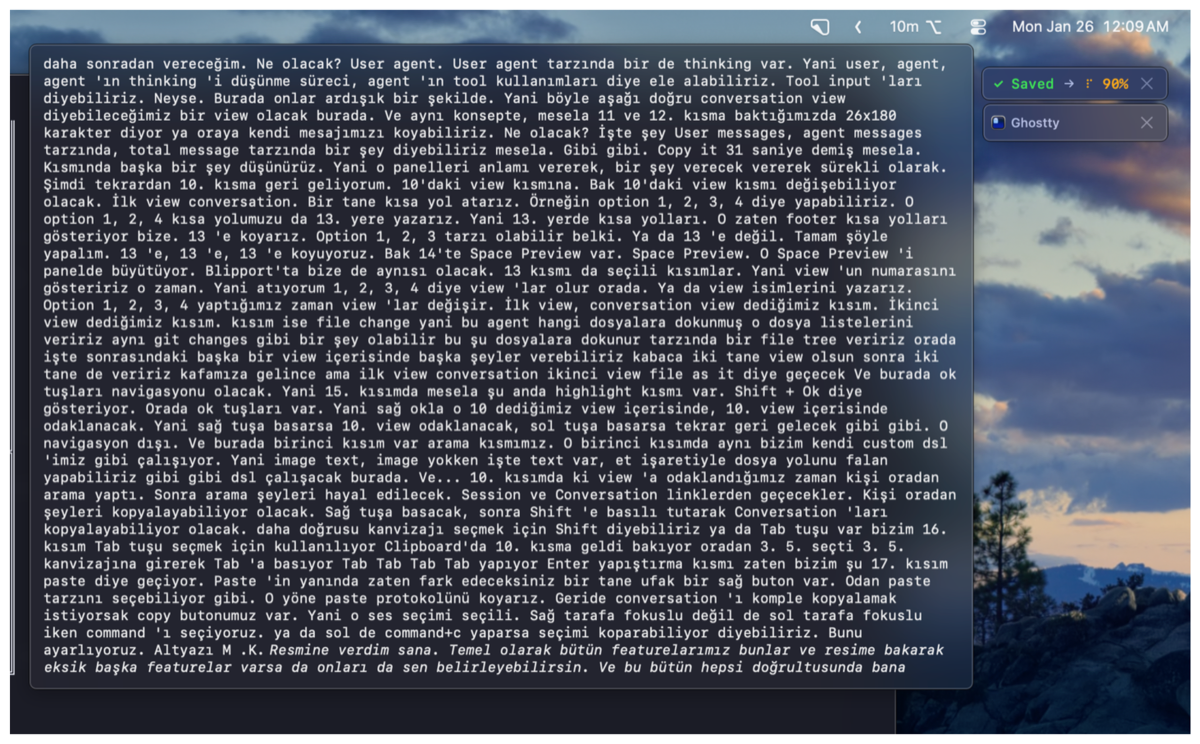
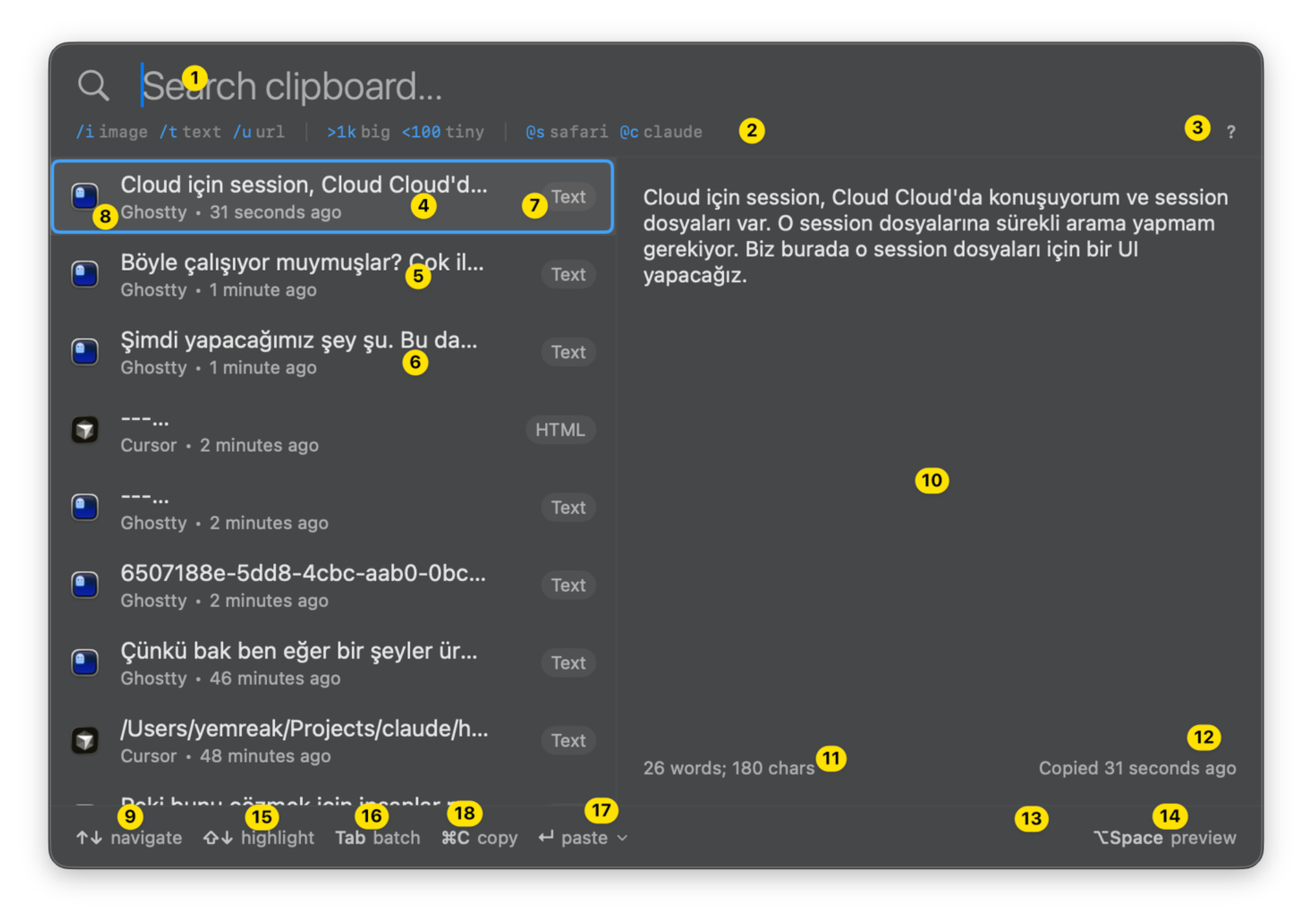
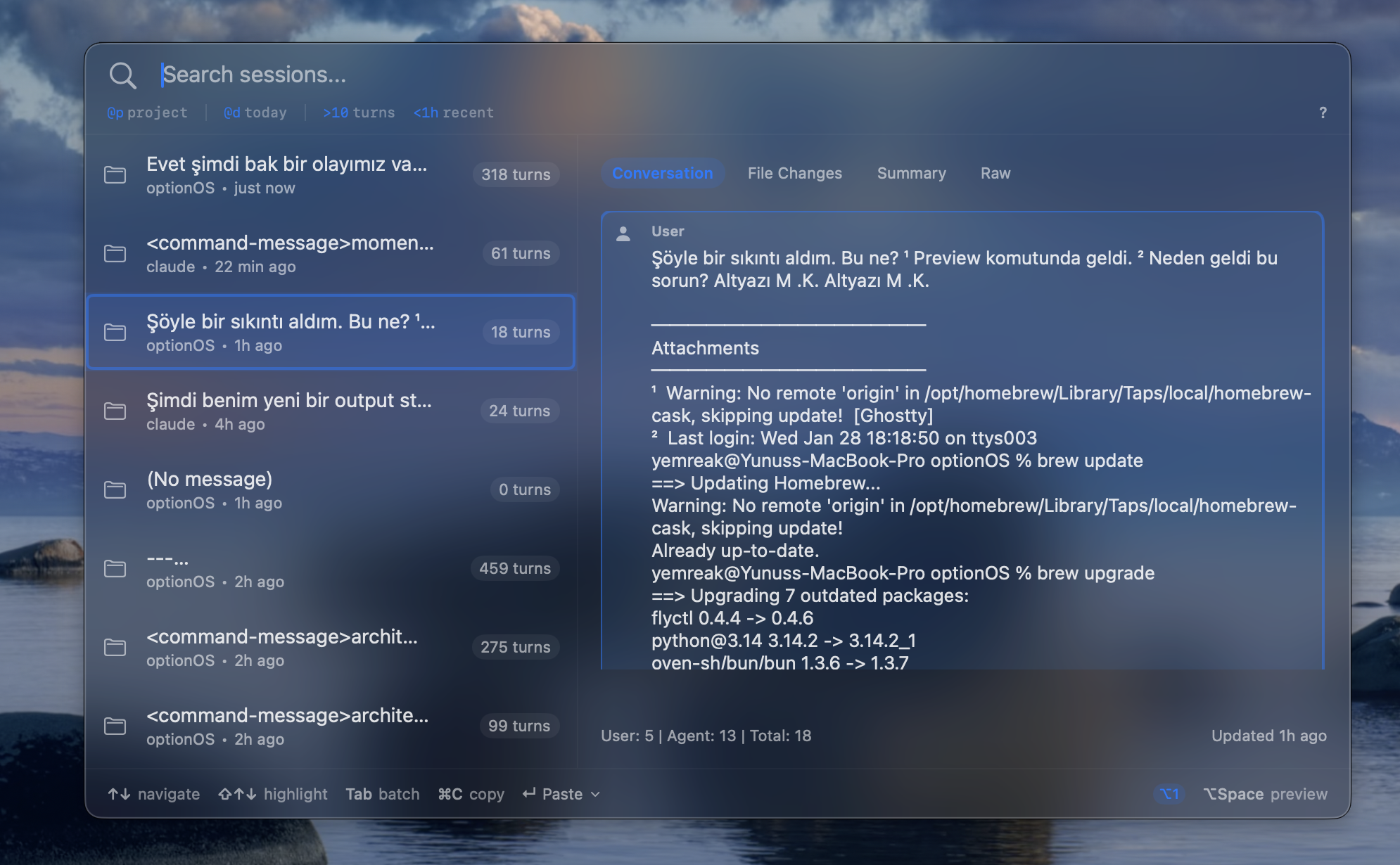
For example, when I describe by voice, AI produces a brief like this:
╔══════════════════════════════════════════════════════════════════════════════╗
║                       CLAUDE SESSIONS - FEATURE BRIEF                        ║
╠══════════════════════════════════════════════════════════════════════════════╣
║  MODULE: Sources/Modules/ClaudeSessions/                                     ║
║  SIZE: Large independent module, like Clipboard                              ║
║  SOURCE: Local JSONL session files (Claude Code)                             ║
╠══════════════════════════════════════════════════════════════════════════════╣
║  UI LAYOUT:                                                                  ║
║  ┌───────────────────────────────────────────────────────────────────────┐   ║
║  │ ① Search Sessions...                                          ③ ?    │   ║
║  │ ② @p project  @d today  >10 turns  <1h recent                        │   ║
║  ├─────────────────────────────┬─────────────────────────────────────────┤   ║
║  │ ④ [Session Title/First Msg] │ ⑩ PREVIEW PANEL (CHANGING VIEW)        │   ║
║  │ ⑧ optionOS • 30 min ago  ⑦ │                                         │   ║
║  │ ⑤ [Session 2...]            │    View 1: Conversation                │   ║
║  │ ⑧ claude-code • 1h ago      │    ┌─────────────────────────────────┐ │   ║
║  │ ⑥ [Session 3...]            │    │ [User] Message content...       │ │   ║
║  │ ⑧ web-app • 2h ago          │    │ [Agent] <thinking>...</thinking>│ │   ║
║  │                             │    │ [Agent] Response...              │ │   ║
║  │                             │    │ [Tool: Read] file.swift         │ │   ║
║  │                             │    └─────────────────────────────────┘ │   ║
║  │                             │                                         │   ║
║  │                             │    View 2: File Changes                │   ║
║  │                             │    (Git diff style - touched files)    │   ║
║  │                             │                                         │   ║
║  │                             │ ⑪ User: 5 | Agent: 8 | Total: 13       │   ║
║  │                             │ ⑫ Last updated: 31 seconds ago         │   ║
║  ├─────────────────────────────┴─────────────────────────────────────────┤   ║
║  │ ⑨ ↑↓ navigate  ⇧↑↓ highlight  Tab batch  ⌘C copy  ↵ paste ▾         │   ║
║  └───────────────────────────────────────────────────────────────────────┘   ║
╠══════════════════════════════════════════════════════════════════════════════╣
║  NAVIGATION:                                                                 ║
║  ↑↓       → Navigate session list (left panel)                              ║
║  →        → Focus preview panel (right panel)                               ║
║  ←        → Return to session list                                          ║
║  ⇧↑↓      → Multi-select (highlight range)                                   ║
║  Tab      → Add to batch (conversation items)                               ║
║  ⌥1/2/3/4 → Switch view (Conversation/FileChanges/TBD/TBD)                  ║
║  ⌥Space   → Expand/collapse preview panel                                    ║
║  ⌘C       → Copy selected item(s)                                           ║
║  ↵        → Paste (with strategy)                                           ║
╚══════════════════════════════════════════════════════════════════════════════╝
Then AI outputs the file structure — I call this placement:
PLACEMENT

Sources/Modules/ClaudeSessions/
├── Features.swift      ← ALL USER-FACING (protocols, types, state, keyboard)
├── Core.swift          ← Session parsing, JSONL reader, search engine
├── Module.swift        ← Feature protocol, MenuBar registration
└── UI/
    ├── Browser.swift   ← AllFeatures conform, business logic
    ├── Panel.swift     ← FloatingPanel (NSPanel wrapper)
    ├── Native.swift    ← NSViewRepresentable bridges
    └── Views.swift     ← SwiftUI Views

Did I understand correctly? Should I start with Features.swift?
It writes in one shot. After the placement is approved, AI writes 3-4 files in parallel. Each one ~900 lines. In one go. The context window fills up fast but the job gets done.
7. Hooks/Slash Commands: Depends on Your Style
I’m constantly changing architecture, doing trial and error. Hooks are maintenance overhead for me.
But if your architecture is stable, “if it works don’t touch it” mindset → hooks are perfect.
It’s not about the power of the technology, it’s about matching your style.
I work in bursts — I suddenly get hyped, the first 2-3 hours are an incredibly productive flow cycle. That’s why during those moments I open voice recording and describe the entire feature, put dots on the picture, gather the details. I give everything to AI in one shot.
8. Instinct and Taste
8 years of software development. Judgment, taste, instinct in architecture — these are valid.
I feel it when I see it now: “something doesn’t fit here.” I let my instinct handle certain parts. There shouldn’t be rigid rules.
Same thing looking at AI output — bad output doesn’t mean it was used badly. But if your instinct says “hold on a second,” hold on.
Final Words
Different for burst workers, different for methodical workers. Know your own rhythm, use the tool accordingly.
This post is my experience. It might work differently for you. But I hope something here is useful.
6-7 months, averaging 8-10 hours of Claude Code per day. Dictation, hooks, slash commands — tried them all. This is the result.